CrawlRhino SEO Crawler: A Windows Desktop Tool for Technical SEO Audits
CrawlRhino SEO Crawler is a desktop application built for Windows that crawls websites the way a search engine would, surfacing technical SEO issues, broken links, indexability problems, and internal linking weaknesses. It runs locally on your machine rather than through the cloud, and is positioned as a desktop alternative to tools like Screaming Frog SEO Spider.
Software Information
Title: CrawlRhino SEO Crawler Pro
Developer: CrawlRhino, based in the United Kingdom
Platform: Windows 10 and Windows 11
Official Website: CrawlRhino
CrawlRhino SEO Crawler Pro Overview

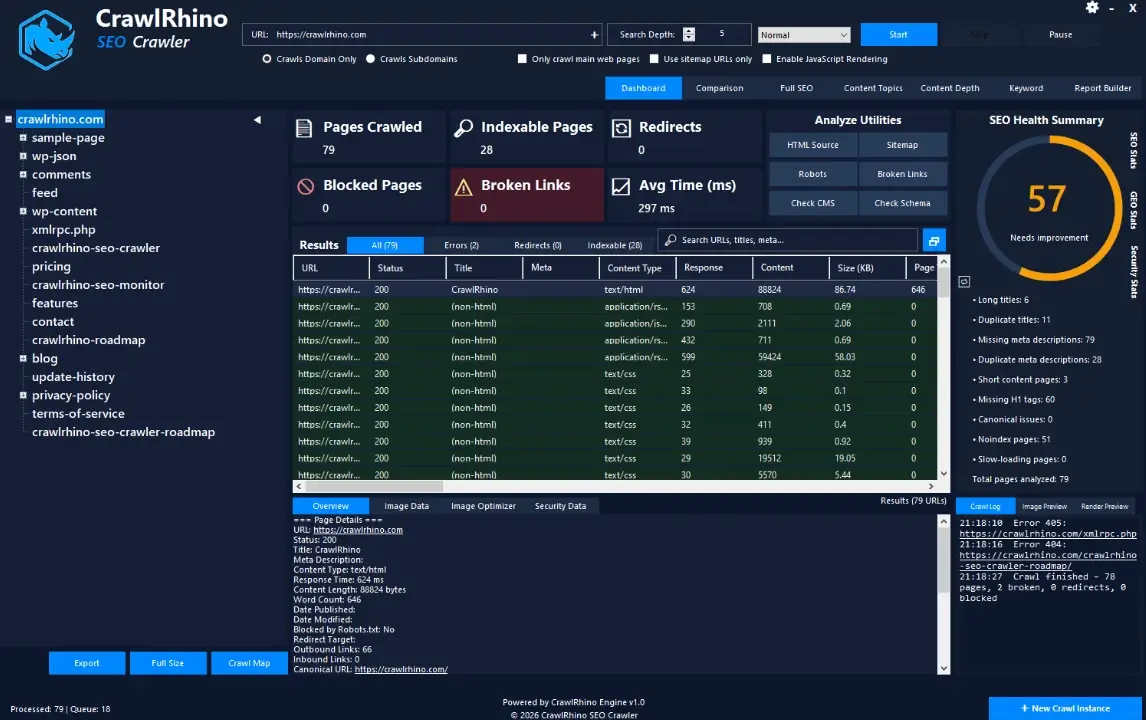
CrawlRhino SEO Crawler scans a website URL by URL, mapping out its structure and flagging the technical issues that affect search visibility. It checks status codes, canonical tags, indexability signals, crawl depth, and internal linking patterns, then presents everything in a tree-view dashboard that makes large sites easier to navigate.
Because the crawler runs directly on your Windows machine instead of through a remote server, crawling and analysis tend to move faster than cloud-based SEO tools that depend on external infrastructure. The software also includes a built-in Internal Link Authority explorer, which visualizes how pages connect to one another and highlights pages that are weakly linked internally, something that often gets missed in manual audits.
CrawlRhino also renders JavaScript-heavy pages using a Chromium-based engine, so sites that load content dynamically can still be crawled and analyzed accurately, not just their raw HTML.
Also Check Out: CrawlRhino SEO Monitor
CrawlRhino SEO Crawler Pro Key Benefits
- Runs locally on Windows: Crawling happens directly on your machine, which generally means faster results than cloud-hosted crawlers that rely on remote processing.
- Built for real technical audits: The tool focuses specifically on the technical side of SEO, including status codes, canonical tags, crawl depth, and indexability, rather than general marketing metrics.
- Understands modern websites: JavaScript rendering means dynamically loaded content is analyzed the way a modern browser would see it, not just the raw source code.
- Visualizes site structure: The tree-view layout and Internal Link Authority explorer make it easier to understand how a large website is structured and where its weak points are.
- Handles multiple sites at once: Several domains can be added to a crawl list and analyzed within the same session instead of one at a time.
- Detects a wide range of on-page issues: From missing titles and duplicate meta descriptions to broken forms and missing alt text, the crawler checks far beyond basic link errors.
CrawlRhino SEO Crawler Pro Key Features
Technical SEO Auditing
- Status Code and Indexability Analysis: Reviews HTTP status codes, canonical tags, noindex directives, and indexability signals across every crawled URL.
- Metadata Analysis: Checks page titles, meta descriptions, heading structure, and identifies missing or duplicate metadata.
- Technical SEO Issue Detection: Flags missing page titles, duplicate titles, missing meta descriptions, and canonical tag problems across the site.
- Website Structure Mapping: Displays crawled pages in a tree-view format, analyzes crawl depth, and identifies orphan pages that aren’t linked from anywhere else on the site.
Link and Redirect Analysis
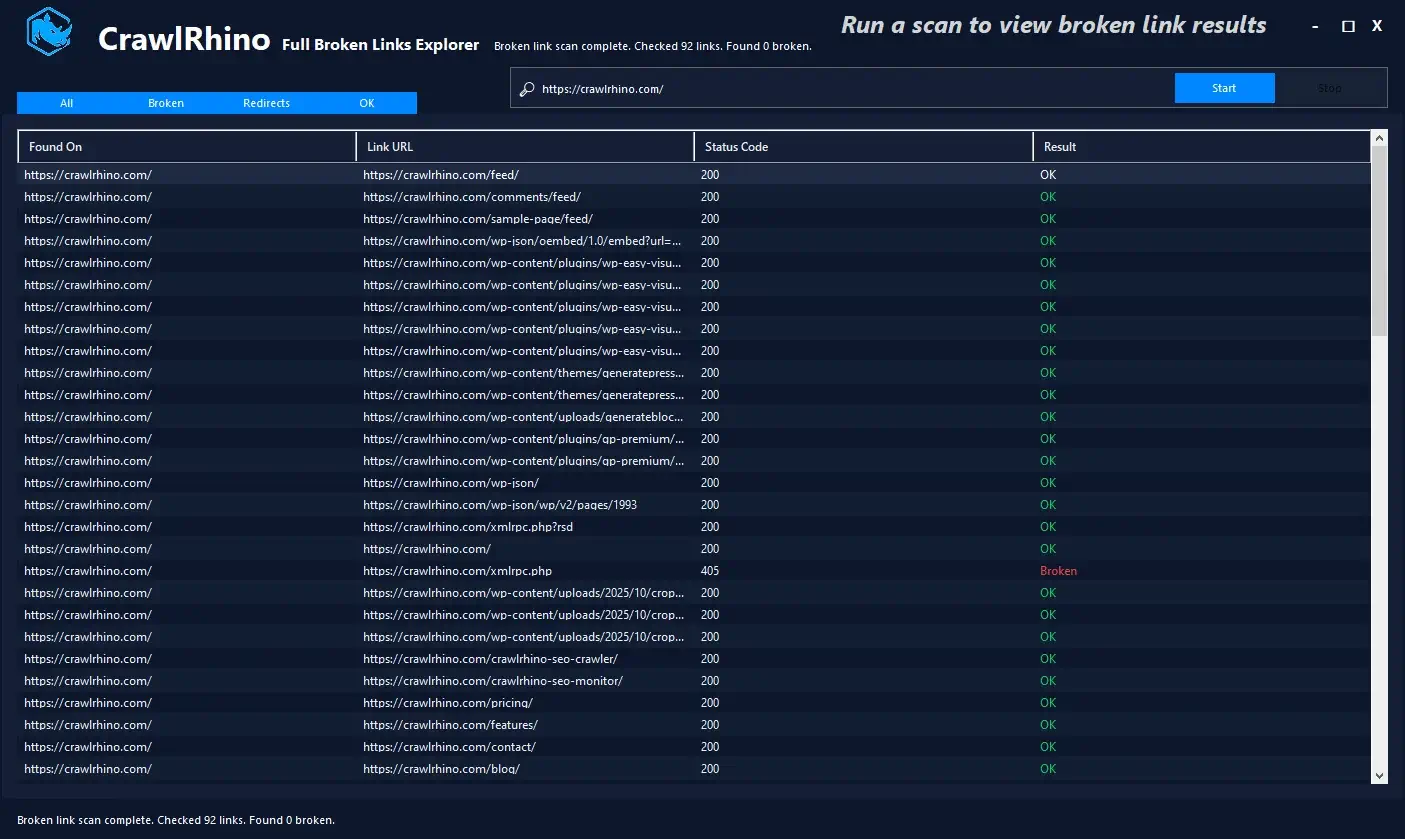
- Broken Link Checker: Detects broken links and 404 errors across a crawled website.
- Redirect Chain Detection: Identifies redirects, redirect chains, redirect loops, and analyzes where each redirect ultimately leads.
- Internal Link Authority: Visualizes the strength of internal links across the site and identifies pages that are weakly linked internally.
- Inlink and Outlink Analysis: Reviews inbound and outbound links on a page-by-page basis to help refine internal linking strategy.
Content and On-Page Detection
- Heading Structure Detection: Identifies H3 through H6 heading counts in addition to standard title and heading analysis.
- Paragraph and List Detection: Detects paragraph counts along with lists and list items on each page.
- Table, Form, and Input Detection: Identifies tables, forms, input fields, and textarea elements present on crawled pages.
- Embedded Video Detection: Flags pages containing embedded video content.
- Downloadable File Link Detection: Identifies links pointing to downloadable files across the site.
- Bold and Strong Tag Usage: Tracks usage of bold and strong text formatting tags.
- FAQ Schema Detection: Detects whether FAQ schema markup is present on a page.
- Missing Alt Text Detection: Flags images that are missing alt text, which affects both accessibility and image SEO.
- Schema Verification Tool: Includes a button to check whether schema markup is working correctly and to view the current markup on a page.
Crawling and Performance
- JavaScript Rendering: Renders JavaScript-heavy pages using a Chromium-based engine so dynamically loaded content can be analyzed accurately.
- XML Sitemap Crawling: Imports XML sitemaps and compares sitemap URLs against the pages actually discovered during a crawl.
- No Depth Limit Option: Allows the crawler to follow internal links without any depth restriction when a full, unrestricted crawl is needed.
- Turbo Crawl Mode: Speeds up crawling for faster results on larger websites.
- Multi-Site Batch Crawling: Adds multiple domains to a single crawl list and analyzes them within the same session.
- Multiple Crawler Instances: Runs more than one crawl session at the same time.
- Custom User Agent: Lets you customize the crawler’s user agent, with automatic fallback to the default if an invalid one is entered.
- Ignore Robots.txt Option: Allows crawls to bypass robots.txt restrictions when needed for a full technical review.
- Response Time Monitoring: Measures page response times during crawling to flag pages that may be slowing down site performance.
Workflow and Interface Tools
- Projects Window: Manages multiple crawling projects separately, with each project storing and organizing its own data.
- Saved Crawl History: Retains crawl data between sessions, including timestamps, so previous crawls can be reviewed after closing and reopening the app.
- Dashboard Filtering: Includes filter tabs and a filter box to quickly isolate errors, redirects, indexable pages, and specific URLs or titles.
- Full Data Explorer: A dedicated window with advanced SEO filtering for digging deeper into crawl results.
- Context Menu on Crawl Results: Right-click options let you copy a URL, open it in a browser, check its index status, view its Wayback Machine history, or run a Google Insights test.
- Highlighted SEO Issues: Surfaces SEO issues directly within the crawl results instead of requiring a separate report.
- Customizable Interface: Includes a light theme option, fullscreen mode, resizable panels, and a dashboard that remembers its last window size and position.
- Render Preview: Shows what a page looks like as it renders during the crawl, giving a clearer picture of how the page actually loads.
Image Tools
- Image Optimizer: Compresses and resizes images found on the crawled website.
- Image Data and Lists: Displays a list of images found on each page along with detailed data about each one.
- Image Preview: Shows a preview of the currently selected image within the app.
Reporting
- Report Builder: Builds SEO reports with a fullscreen mode and a larger preview window for reviewing output before export.
- Advanced Export: Exports crawl data in formats including CSV and HTML reports for further analysis outside the app.
What’s new in CrawlRhino SEO Crawler Pro 1.1.39?
The current version, 1.1.37, was released in September, 2026. According to the official changelog, this update includes:
- Minor improvements made.
CrawlRhino SEO Crawler Pro Tested Screenshots
System Requirements
| Component | Requirement |
|---|---|
| Operating System | Windows 10 or Windows 11 |
| Installation Type | Local desktop installation, no cloud dependency for crawling |