CyberLink PowerDirector Ultimate: AI-Powered Video Editing for Windows
CyberLink PowerDirector Ultimate brings together video editing, AI-powered tools, and creative effects in one application for Windows. Its timeline-based editor gives users control over their projects, while AI features help with tasks such as generating video clips, removing unwanted objects, improving footage, and preparing content for publication. Whether you’re working with raw footage or creating a video from a simple text prompt, PowerDirector offers tools to help you move from the initial idea to the finished video.
CyberLink PowerDirector Ultimate Information
- Developer: CyberLink Corp
- Platform: Windows
- Official Website: CyberLink
CyberLink PowerDirector Ultimate Overview
PowerDirector brings its tools together across six main areas: AI Agents, AI Creation, AI Editing, Video Editing, Audio and Speech, and Assets and Export. This setup allows users to begin with a text prompt, a photograph, or a collection of video clips and then refine the results using the application’s timeline and editing controls.
One of the key additions is the Agentic Editor, which lets users describe an editing task in everyday language and apply changes across multiple files. The results appear directly on the timeline, where they can be adjusted further. Video Edit by Chat offers another way to modify existing footage: users can describe the style they want or provide a reference photo, then refine the result through conversation. AI Storytelling arranges raw clips into a rough sequence and adds narration, while Auto Edit selects highlights from up to 100 uploaded clips and synchronizes them with music.
PowerDirector can also create new content rather than relying entirely on existing footage. AI Text to Video generates clips from written prompts, while AI Image to Video adds movement to still photographs. AI Cinematic Shorts turns a single photo into a short cinematic clip with camera movement, ambient sound, and background music. Other creative options include Character Motion Swap, which transfers recorded movement to a character or avatar, and AI Music Generator, which creates background tracks based on the selected mood, genre, and duration.
For users who need to correct or improve existing footage, Video Quick Actions can automatically adjust lighting, color, and audio. AI Video Object Removal helps remove unwanted people or objects, including those appearing in moving scenes, while AI Background Removal separates subjects from their backgrounds without requiring a green screen. Auto Reframe makes it easier to adapt a project to different aspect ratios for social media and other platforms.
Alongside these AI-assisted features, PowerDirector retains the editing controls needed for more detailed work. Its professional editing tools include multi-track timelines, multi-camera editing, keyframe animation, color matching, and color grading. Hardware acceleration through supported Intel, NVIDIA, and AMD graphics hardware helps manage demanding editing and export tasks.
Also Check Out: Native Instruments Maschine
CyberLink PowerDirector Ultimate Key Benefits
- Handle the entire editing process in one application: Create footage, edit clips, improve image and sound quality, add effects, and export the finished project without constantly switching between different programs.
- Spend less time on repetitive tasks: AI-assisted object removal, reframing, color correction, and noise reduction can simplify work that would otherwise require detailed manual adjustments.
- Combine automation with hands-on editing: AI tools can help prepare an initial cut, while the timeline, keyframes, multi-camera editing, and color controls let you refine the final result.
- Access creative assets within the editor: Titles, transitions, effects, LUTs, stickers, music, sound effects, and video templates are available as part of the editing workflow.
- Make use of supported PC hardware: Intel, AMD, and NVIDIA GPU acceleration, along with support for selected Intel NPUs, helps improve performance on compatible systems.
- Prepare videos for different platforms: Flexible export options make it possible to create videos for a range of devices and publishing platforms, including YouTube, TikTok, Facebook, and Vimeo.
CyberLink PowerDirector Ultimate Key Features
AI Agents
- Agentic Editor: Describe the changes you want in plain language and apply editing tasks across multiple files. The results appear on the timeline, where you can review and adjust them.
- Video Edit by Chat: Explain the style or look you’re aiming for, or upload a reference photo, then refine the video through an ongoing conversation with the AI.
- AI Storytelling: Turns a collection of uploaded clips into a structured sequence, adds narration, and prepares an initial rough cut for further editing.
- Auto Edit: Selects highlights from up to 100 uploaded clips, matches them to music, and creates a first cut that you can refine.
AI Creation
- AI Text to Video: Creates video clips from written prompts using a selection of AI models.
- AI Image to Video: Adds movement to still photographs, with camera motion, depth effects, and synchronized audio.
- AI Image Generator: Creates images from text descriptions using different selectable AI models.
- AI Cinematic Shorts: Transforms a single photograph into a short film-style clip with camera movement, natural sound, and background music.
- AI Model Lab: Brings together multiple third-party AI models for text-to-image, text-to-video, and image-to-video generation within the application.
- Character Motion Swap: Transfers recorded human movement to a character or avatar, allowing the same motion to be used with different character styles.
- AI Music Generator: Creates original background music based on settings such as genre, mood, tempo, and duration.
- AI Voice Translator: Translates and clones a voice into other languages while preserving its tone and matching the translated speech to lip movements.
- AI Speech to Text Transcription: Converts spoken dialogue into text and generates captions in multiple languages.
- AI Talking Avatar: Creates an animated talking avatar with AI-generated narration and synchronized movement.
- AI Text to Speech: Converts written scripts into spoken narration using a range of available voices or a cloned voice.
AI Editing
- Video Quick Actions: Analyzes footage and applies suitable corrections to lighting, color, and audio in one step.
- AI Video Object Removal: Removes unwanted people or objects from video footage, including moving subjects and objects in complex scenes.
- AI Video Enhancement: Upscales footage, reduces noise, and improves brightness to help make grainy or low-quality clips clearer.
- Auto Reframe: Adjusts an entire project to different aspect ratios, reducing the need to reframe each file individually.
- AI Auto Face Blur: Detects faces in a video and applies Mosaic or Gaussian blur to help obscure them.
- AI Background Remover: Removes or replaces backgrounds in videos and photos without requiring a green screen.
- AI Motion Tracking: Tracks moving objects frame by frame so text and graphics can follow their movement.
- AI Body Effects: Applies visual effects automatically to people or objects as they move through a scene.
- AI Object Mask: Identifies and isolates individual objects to create masks for targeted effects and adjustments.
- AI Frame Interpolation: Generates additional frames to make movement appear smoother.
- AI Text-Based Editing: Transcribes video dialogue and lets users remove unwanted sections by deleting words from the text.
- AI Library Search: Finds clips, subjects, and scenes through keyword searches processed locally on the PC.
- AI Replace: Allows users to brush over an object in a photo and replace or remove it within the project.
Video Editing
- Chroma Key and Green Screen: Uses multi-key color sampling to help create cleaner composites and remove selected background colors.
- Video Stabilizer: Reduces unwanted camera shake in handheld recordings and action footage.
- Color Enhancement and Color Match: Applies automatic color corrections and matches the color appearance of a reference clip or image across a project.
- Multi-Cam Editing: Lets users switch between synchronized camera angles when editing footage recorded from multiple cameras.
- Brand Kits: Keeps brand assets, colors, and design elements organized so they can be reused consistently across projects.
- Keyframe Controls: Provides detailed control over the timing and movement of effects, animations, and masks.
- Video Speed Controls: Changes clip speed directly on the timeline through click-and-drag controls.
- Video Collage: Creates customizable split-screen layouts with animated opening and closing sequences.
- Blending Modes: Combines video clips and images using nine different blending modes.
- Animated Overlays: Adds layered effects such as lens flares, light leaks, film grain, and other visual elements.
- Portrait Preview: Displays a project in a 9:16 preview window, making it easier to work with vertically recorded footage.
- Lens Correction: Corrects common lens and perspective issues, including keystoning, fisheye distortion, chromatic aberration, and vignetting.
- Intel NPU Acceleration: Uses supported Intel neural processing units to handle AI tasks, helping improve preview performance and reduce the workload on the CPU and GPU.
- GPU Optimization: Includes NVIDIA Broadcast support for enhanced audio and video processing performance.
Audio and Speech
- AI Voice Clone: Creates a reusable voice profile for maintaining consistent narration across different projects.
- AI Audio Denoise: Detects and reduces unwanted background noise in audio recordings.
- AI Speech Enhancement: Improves recorded voices to make dialogue clearer and easier to understand.
- AI Wind Removal: Identifies and reduces wind noise in outdoor recordings.
- AI Voice Changer: Changes recorded voices using more than 100 voice presets, including human-style voices and special effects.
- Audio Ducking: Automatically lowers background music when dialogue or narration needs to remain clear.
Assets and Export
- 130M+ Royalty-Free Stock: Provides access to video, image, and music assets from Getty Images and the Meta Sound Collection.
- Intro Templates: Includes thousands of customizable video intro templates, along with a built-in designer for making adjustments.
- Title Animations: Offers animated text sequences for entrances, exits, and looping effects.
- Motion Graphic Templates: Provides customizable animated title templates for adding movement and visual interest to projects.
- Transitions: Includes hundreds of pre-designed transitions for connecting shots and scenes.
- Background Music and Sound Effects: Provides a built-in audio library for adding music and sound effects to a project.
- Export to YouTube and TikTok: Helps prepare videos according to the recommended export specifications for each platform.
- Live Streaming: Supports direct streaming to Twitch, YouTube, and Facebook from a webcam, screen, or gaming device, with chroma key and overlay options.
- Screen Recording: Records full-screen or selected-window activity in high resolution, with separate dual-track capture for screen and webcam footage.
What’s New in CyberLink PowerDirector Ultimate 2027?
CyberLink PowerDirector Ultimate 2027 was released in September 2026. According to the supplied release notes, this version introduces new editing tools, additional AI models, and several workflow improvements.
New Features
- Agentic Editor: Work with multiple files and describe complex editing tasks in plain language. The resulting edits are added to the timeline, where you can continue refining them.
- AI Cinematic Shorts: Turn a single photograph into a short cinematic video. Choose a visual style and let AI add camera movement, natural sound, and matching background music.
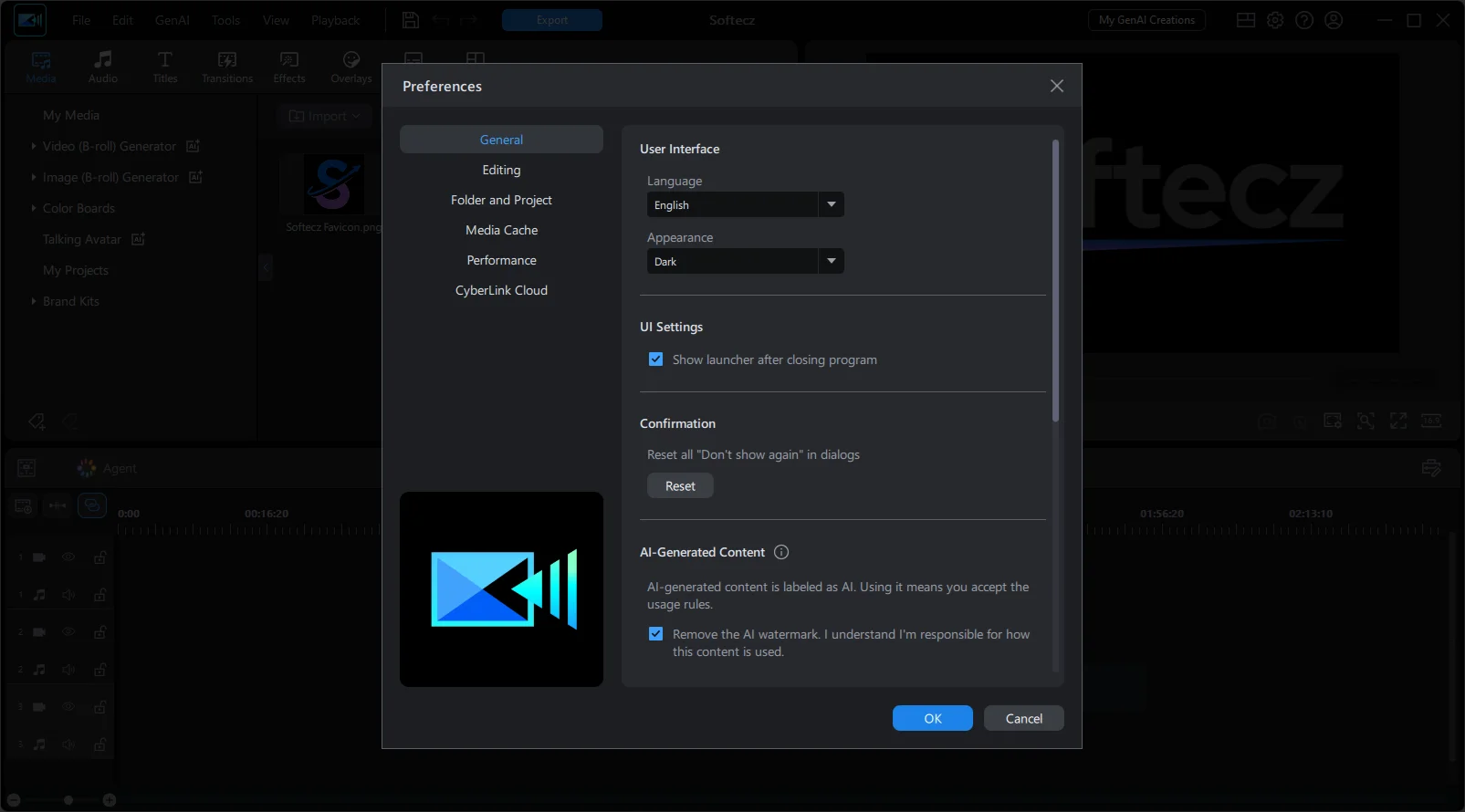
- Light/Dark Mode: Switch between light and dark interface appearances to suit your workspace and personal preference.
Enhancements & Additions
- New AI Models: Image-to-Video: Adds Wan 3.0, Seedance 2.0, Seedance 2.0 Fast, Seedance 2.0 Mini, Seedance 2.5, Gemini Omni, and Gemini Omni 1.1. These models provide additional options for generating realistic movement, with Seedance 2.5 supporting clips of up to 30 seconds.
- New AI Models: Text-to-Video: Adds Wan 3.0, Seedance 2.0 Fast, Seedance 2.0 Mini, Seedance 2.5, Gemini Omni, and Gemini Omni 1.1. The new options support prompt-based video generation with improved prompt understanding and natural movement. Seedance 2.5 supports clips of up to 30 seconds.
- New AI Models: Video Edit by Chat: Adds Wan 3.0, Seedance 2.0, Seedance 2.5, and Gemini 1.1, giving users more options for making precise edits through text prompts.
- New AI Model: Character Motion Swap: Introduces SCAIL-2, designed to preserve character details during complex movements and support both photo and video backgrounds.
- New AI Models: Text-to-Image: Adds Kling Omni 3.0 and Seedream 5.0 Pro for generating images with richer details and more refined results.
- Custom Output Duration: Lets users specify the desired clip length when generating videos with AI Image-to-Video and Text-to-Video.
- Speech to Text: Adds support for Swedish, Danish, Norwegian, and Finnish transcription.
- AI Storytelling: Improves narration speed when using voice cloning.
- AI Content Credentials: Adds provenance information to AI-generated content. Exports include machine-readable details about what was generated, which tool was used, and when it was created. Users can also enable a visible AI label during export.
- New Video Effects & Titles: Adds Highlight and Light video effects, along with new title animations for additional creative options.
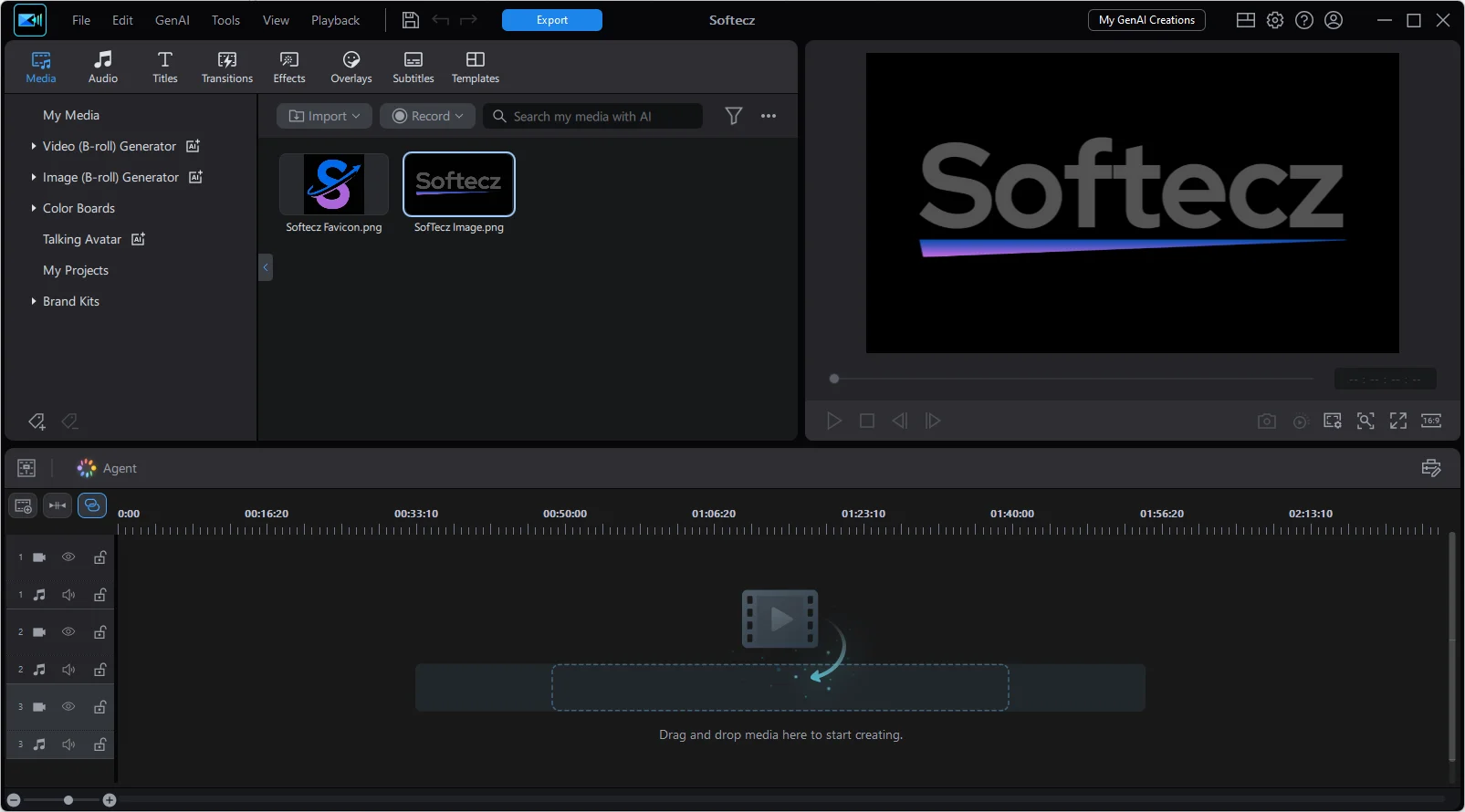
CyberLink PowerDirector Ultimate Tested Screenshots
System Requirements (Windows)
| Component | Requirement |
|---|---|
| Operating System | Windows 11 or Windows 10, 64-bit only (Windows 11 Arm64 supported) |
| Processor (Intel) | Intel Core i-series, 6th generation or above; Haswell 4th generation Core i7-4770 (Core and Xeon branded only) or above required for AI features |
| Processor (AMD) | AMD Ryzen series or above, AMD Phenom II or above; AMD A8-7670K or above, AMD Ryzen 3 1200 or above required for AI features |
| Processor (Qualcomm) | Snapdragon 8cx Gen 3 or Snapdragon X Elite |
| Graphics Card (Standard Video) | 128 MB VGA VRAM or higher |
| Graphics Card (360-Degree Video) | DirectX 11 compatible |
| Graphics Card (AI Plugins) | 2 GB VGA VRAM or higher |
| Graphics Card (NVIDIA Denoise) | NVIDIA GeForce RTX 2060, Quadro RTX 3000, TITAN RTX, or higher |
| RAM | 8 GB required, 16 GB or above recommended |
| Storage | 7 GB free disk space |
| Sound Card | Windows-compatible sound card required |
| Screen Resolution | 1024 x 768, 16-bit color or above |
| Internet Connection | Required for initial activation, online services, and program and AI component updates |
| Burning Device | Required only for disc burning features |
Supported File Formats (Windows)
| Category | Supported Formats |
|---|---|
| Video Import | H.265/HEVC (8-bit and 10-bit, HDR10 and HLG), MOD, MVC (MTS), MOV (H.264, HEVC, alpha PNG, ProRes 10-bit 4:2:2), MPEG-1, MPEG-2, Dual-Stream AVI, MPEG-4 AVC, FLV, MP4 (XAVC S, XAVC 8-bit 4:2:0), MKV, TOD, 3GPP2, VOB, AVCHD, VRO, AVI, WMV, DAT, WMV-HD, WTV, DV-AVI, Dolby Digital audio, WebM (VP9), HDR formats, ProRes 4:2:2, MXF AVC 4:2:0, V210 4:2:2, XAVC 4:2:0 |
| 360-Degree Video | Equirectangular MP4 (H.264), up to 4K resolution, 2:1 aspect ratio |
| Audio Import | WAV, MP3, WMA, M4A, OGG, FLAC, AAC, Dolby Digital, Dolby Digital Plus, WAVE, MPEG-1 Layer III, ALAC, ADPCM |
| Photo Import | MPO, JPS, RAW, GIF, BMP, JPG, TIF, PNG, Animated GIF, HEIC, APNG |
| 360-Degree Photo | Equirectangular JPG or TIF, 2:1 aspect ratio |
| Look-Up Table Import | 3DL, CUBE, CSP, CMS, RV3DLUT |
| Video Capture Devices | Analog TV tuners, CI or USB capture devices compliant with WDM standard |
| Video Export | AVCHD, AVCHD 2.0 (3D/Progressive), MPEG-2 HD, WMV-HD, H.264 AVC, WMV, H.265 HEVC, XAVC S (up to 4K), MKV, MPEG-2, MPEG-4, image sequence (JPG/PNG), animated image (GIF/APNG), 360-degree MP4 |
| Color Space Export | SDR Rec. 709, HDR Rec. 2100 HLG and PQ (MP4 HEVC only) |
| Audio Export | AAC, WMA, LPCM |
| Disc Creation | 3D DVD/AVCHD/Blu-ray burning, standard DVD burning, Blu-ray BDMV burning, AVCHD disc burning, DVD/Blu-ray with LPCM 2-channel audio |