Atomix VirtualDJ Pro Infinity: Mix Better with Innovative Technology for DJs
Atomix VirtualDJ Pro Infinity brings a wide range of modern DJ tools into one application. Whether you’re learning to mix for the first time or performing professionally, it offers the features you need to create smooth transitions, remix tracks, mix videos, and deliver engaging performances.
Atomix VirtualDJ Pro Infinity Information
- Developer: Atomix Productions
- Platform: Windows
- Official Website: VirtualDJ
Atomix VirtualDJ Pro Infinity Overview
VirtualDJ combines a broad set of DJ tools with technology designed to make mixing more creative and flexible. Its feature set continues to evolve, giving DJs access to modern mixing techniques, performance tools, and ways to work with music and video.
Despite its extensive capabilities, VirtualDJ remains approachable for beginners. You can start with basic mixing and gradually explore more advanced controls as your skills develop. It suits a variety of situations, from practicing at home and broadcasting online to performing at weddings, clubs, and other events. DJs can also use it for scratch performances and video mixing.
VirtualDJ takes advantage of modern computer hardware to give DJs more control over individual elements within a track. It can separate vocals, instruments, kicks, hi-hats, and other components in real time, allowing you to create mash-ups, remixes, and transitions in ways that traditional mixing tools cannot easily achieve.
Also Check Out: NetSarang Xmanager Power Suite
Atomix VirtualDJ Pro Infinity Key Benefits
- Powerful Yet Easy to Use: VirtualDJ combines advanced DJ technology with an intuitive interface, making it accessible to beginners while offering plenty of room for experienced DJs to explore.
- Suitable for Different DJs: Whether you’re practicing in your bedroom, working as a mobile DJ, or performing on a professional stage, VirtualDJ can adapt to different styles and experience levels.
- Flexible Hardware Support: Connect compatible controllers and mixers with plug-and-play detection and automatic setup. You can choose the equipment that best fits your workflow.
- Get More from Your Controller: VirtualDJ provides advanced mixing and performance tools that can extend what you can do with your DJ hardware.
- Reliable Performance: VirtualDJ is designed with optimized, tested code to support stable performance during live sets and other demanding sessions.
- Access to Online Music: Browse music from supported streaming catalogs, explore curated charts, build playlists, and find tracks to meet audience requests directly within the application.
Atomix VirtualDJ Pro Infinity Key Features
Real-Time Stems Separation
VirtualDJ 2026 can separate different elements of a song while it is playing. This gives you the freedom to adjust vocals, instruments, kicks, hi-hats, and other components on the fly, making it easier to build remixes, create mash-ups, and experiment with new transitions during a performance.
- Create acapella and instrumental versions of songs in real time.
- Explore new approaches to mixing and remixing tracks.
- Create smooth transitions with greater control over individual song elements.
- Use ModernEQ to fine-tune specific parts of a track.
- Access Stems performance pads to isolate elements quickly.
Multi-Deck Stand-Alone DJ Mixer
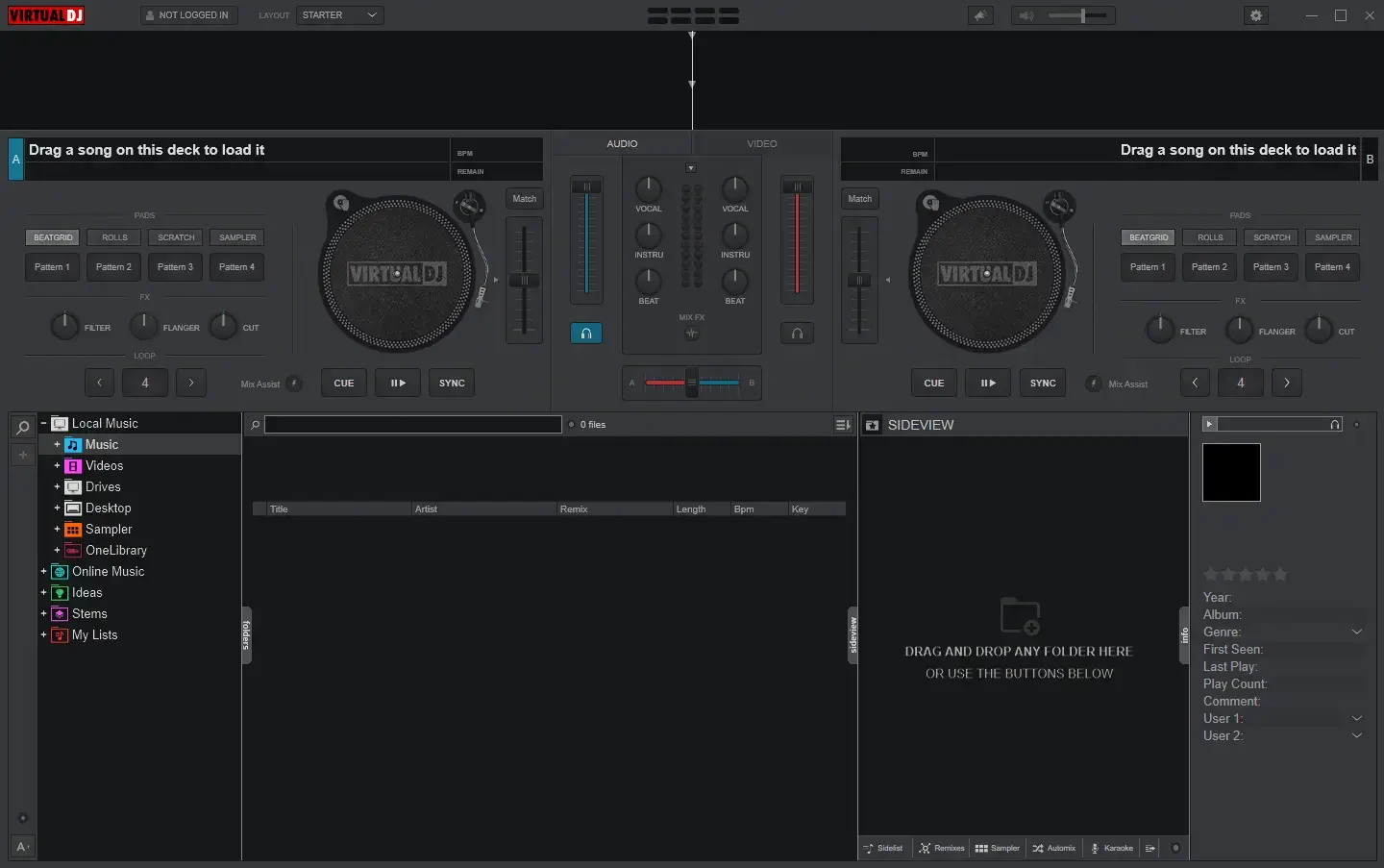
VirtualDJ provides a complete mixing environment, even when no DJ controller or other external hardware is connected. Its interface includes transport controls, jog wheels, track information, waveforms, an advanced mixer, equalization, filters, effects, loops, performance pads, hot cues, and other essential tools. Features such as seamless looping, Smart Sync, and quantized cues help you manage tracks and keep your mixes organized. The combination of these tools makes it easier to learn the basics while leaving plenty of room for more creative performances.
- A powerful interface that remains intuitive and easy to learn.
- Full mixing functionality without connected DJ hardware.
- Smart quantizing features to assist with timing and transitions.
Plug & Play with DJ Gear
VirtualDJ supports more than 300 controllers and works with a wide range of mixers, giving you flexibility when choosing your setup. You can connect compatible equipment and use its plug-and-play support to get started without a complicated configuration process. Supported brands include Pioneer DJ, Numark, Reloop, Denon DJ, Hercules, and Rane, among others. For DJs who want more control, the software includes a mapper interface and MIDI Learn tools for customizing hardware controls. Its scripting language also lets you map and customize many aspects of the application.
Accurate Vinyl Feel
For DJs who prefer traditional turntables or CD players, VirtualDJ includes a low-latency Digital Vinyl System (DVS) engine designed for responsive, accurate control. It supports major timecode formats, along with VirtualDJ’s own optimized DVS signal. The system works with sound cards that provide the necessary audio inputs and outputs, including supported DVS-ready controllers and sound cards.
- Low-latency DVS with Smart, Relative, and Absolute modes.
- Automatic signal calibration.
- Compatibility with DVS-ready hardware.
- Support for popular DVS vinyl formats.
Powerful Video Mixing
VirtualDJ includes a video engine for mixing video content alongside music. It supports leading video formats and high-resolution playback, including Full HD and 4K. You can add video effects, transitions, text overlays, song titles, camera input, screen captures, and other visual elements to create a more engaging performance. On-screen previews and smart video transitions make it easier to manage video changes during a mix. Integration with the VirtualDJ video content catalog also gives video DJs more options for building their sets.
Stunning Visualizations
Even if your set contains only audio tracks, VirtualDJ can turn a screen or projector into part of the performance. It offers thousands of visualizations, including psychedelic patterns, tunnels, animated backgrounds, and equalizer-style effects. Visualizations can run automatically during audio-only playback. A beat-aware algorithm helps synchronize the visuals with the music, while automatic rotation adds variety throughout the set.
- Add visual effects to audio-only performances.
- Explore thousands of available online visualizations.
- Use beat-aware synchronization to match visuals with the music.
Engaging Video Graphics
VirtualDJ offers built-in video skins that display performance information and graphics on video walls, projectors, and other screens. These visuals can help audiences follow the mix by showing information such as loops, effects, cues, the current track, and upcoming songs. Beat tunnels can also give viewers a visual indication of upcoming breaks.
- Use dedicated graphics for video broadcasts.
- Customize and brand your own video skin.
- Download additional video skins through the extensions area.
- Use video graphics for both video DJ sets and audio-only performances.
Karaoke with Next Singer List
VirtualDJ includes karaoke playback tools with on-screen lyrics and support for popular karaoke formats. You can play karaoke tracks on individual decks or use the Karaoke Engine to manage singer names, song keys, and venue information. These details can be saved for future sessions. The application can also display background graphics between songs and show an on-screen list of upcoming singers, helping keep karaoke sessions organized.
- Play popular karaoke formats.
- Enable automatic background music playback.
- Display a list of upcoming singers on screen.
- Customize the appearance with your own branding.
- Connect with the VirtualDJ Karaoke Catalog.
High-Quality Sound
VirtualDJ features a professional-grade audio engine designed to deliver clear sound across a range of DJ setups. Built-in pitch stretching, master tempo, equalizers, filters, effects, and a limiter help you shape your mix while reducing the risk of clipping and distortion. The application supports sound cards ranging from entry-level equipment to professional hardware with high sample-rate capabilities. Automatic hardware detection and an accessible audio setup interface also make it easier to configure your equipment, including more advanced audio routing.
Audio & Video Effects
VirtualDJ comes with built-in audio and video effects, with additional options available through its plugin ecosystem. Audio effects include beat-aware processing, color effects, flangers, filters, echoes, beatgrid effects, and other familiar tools. Video features include effects, transitions, slideshows, visualizations, on-screen text, and camera support. You can extend the available effects with additional plugins, use compatible industry-standard VST effects, and explore the open SDK to develop custom plugins.
- Built-in audio and video effects.
- Additional effects and tools through plugins.
- Support for industry-standard VST and VSTi.
Powerful Sampler
The VirtualDJ sampler lets you organize samples into banks and slots, with colors and icons available to help keep everything easy to find. It supports different playback modes, including stutter and loop, and can handle audio samples, video clips, and still images for on-screen display. You can edit samples, record new material, and work with transparency options through the built-in sampler tools. The application also includes stock samples, with additional instrument packs, video loops, and other content available through the Extensions area.
Performance Pads
Performance pads give you quick access to loops, samples, slicers, loop rolls, hot cues, scratch pads, and other performance tools. You can create and organize your own pad layouts with the built-in Pads Editor, making it easier to tailor the controls to your mixing style.
- Create unlimited pad pages.
- Expand your setup with custom pad pages.
- Design your own performance pads using the Pads Editor.
Library Management
VirtualDJ includes music library tools to help you organize and find tracks quickly. Fast searching, smart filters, and customizable lists make it easier to manage large collections, while the folder tree provides convenient access to files stored on your drives. You can rearrange folders and lists with drag-and-drop controls, organize folders by type or purpose, and create shortcuts to the files and locations you use most often.
- Organize tracks with smart folders and library tools.
- Find songs quickly using search and scope parameters.
- Read track tags automatically and edit them with the tag editor.
- Create quick-access shortcuts to favorite folders and lists.
Lists, Ideas & Smart Filters
VirtualDJ provides dedicated categories for online music, ideas, and lists to help you prepare your sets. You can create and organize playlists, nest lists, rearrange tracks, and use smart filters to find duplicates or songs with compatible keys and BPM values. Smart folders can automatically collect tracks that match criteria you define. When preparing a set, you can also move songs into an Automix playlist or maintain a sidelist of tracks you plan to play next, including requests and other ideas.
Set-Lists & Track History
VirtualDJ keeps a history of your played tracks, organizing sessions into playlists by date, year, and month. This makes it easier to review previous sets and find songs you played at a particular event. You can also create and share online SetLists, connect them with social media, and use CloudDrive to access your collections from different computers or share them with other DJs and collaborators.
Charts
Explore online charts, themed playlists, and music selections shared by other DJs. VirtualDJ’s Community Charts let you publish your own playlists or keep them private for access from other computers. You can also share playlists through social media and follow collections created by individual DJs or groups. The software provides access to popular chart feeds and track information from supported music services, including Beatport and iTunes.
CloudDrive
CloudDrive helps you synchronize music lists and files between computers and access supported content from different locations. You can use it to keep preparation and performance laptops in sync, back up your music library, or retrieve and stream tracks from another computer.
- Access supported music and files from different locations.
- Synchronize tracks between computers.
- Keep a backup of your music library.
Intelligent Automix
VirtualDJ’s Automix feature can play a playlist automatically while selecting transitions based on song structure and beat information. It is useful for background music, early-evening sets, and mobile DJ events where continuous playback is needed. The Automix editor lets you adjust transitions and timing to suit your preferences. It also displays the remaining playlist time, removes played tracks automatically, and allows you to rearrange songs using drag-and-drop controls.
- Create automatic transitions between tracks.
- Add songs and change their playback order easily.
- Customize transitions and timing with the Automix editor.
Powerful Editors
VirtualDJ includes several editors for customizing tracks, preparing performances, and automating tasks. You can create custom song edits, adjust performance tools, add lyrics and graphics, and modify different parts of your workflow. Available tools include the Pads Editor for custom performance layouts, a track editor for cleaning up or extending tracks, a video editor with lyrics lookup, and a sample editor for audio and video samples. Additional editors cover POI action points, BPM, Automix, and track tags.
Radio Broadcast & Podcast
VirtualDJ lets you broadcast mixes to internet radio stations and create podcasts. It supports Shoutcast and Icecast protocols, including automatic track-title information, making it easier to run a web radio station or share a live mix. You can also broadcast directly between PCs so friends can connect to your stream. For podcasting, VirtualDJ supports uploading mixes to its own servers with iTunes-ready integration.
- Use the built-in server for direct PC-to-PC broadcasting.
- Broadcast through standard internet radio protocols.
- Create podcasts with iTunes integration.
Video Broadcast to Social Media
VirtualDJ can stream video mixes to supported social platforms, helping DJs reach audiences beyond the venue. You can add video skins, visualizations, camera overlays, and real-time screen captures to make broadcasts more engaging. These tools are useful for live chats, online performances, and branded streams where you want viewers to see more than the music alone.
- Broadcast video mixes to supported social platforms.
- Add graphics and visual effects with video skins.
- Engage viewers with screen captures and visualizations.
- Include your logo, text, and camera feed in the broadcast.
Record Your Mixes
Record your performances as audio or video using supported formats and quality settings. VirtualDJ can start recording automatically when playback begins and can capture external sources, including microphone input and loopback audio. After recording, you can share your mixes on popular platforms. The software also supports automatic track splitting and exporting track-title cue files for use with compatible CD-burning programs.
- Record audio and video mixes in high quality.
- Share recordings through popular mix-sharing platforms.
- Split recordings into tracks for CD production.
Sandbox Mode
Sandbox Mode lets you prepare the next part of your mix without interrupting the music currently playing for your audience. You can move ahead in the mix, test upcoming transitions, and make adjustments before committing to them. When you leave Sandbox Mode, VirtualDJ returns to the original playback state and position. A visual indicator shows the master output’s playback position, helping you keep track of what the audience is hearing while you prepare the next move.
Online Catalogs
VirtualDJ connects with supported online music providers, giving you access to extensive audio, video, and karaoke catalogs from within the application. Integrated search tools make it easier to find content, including suggestions from online catalogs when a matching local track isn’t available. The available services include professional DJ content pools, with offline caching and playback where supported, as well as streaming integrations for SoundCloud and Deezer.
Live Suggestions & Genius DJ
When you’re unsure what to play next, VirtualDJ can suggest tracks based on what other DJs are playing and the songs in your current selection. GeniusDJ lets you provide a group of tracks and receive suggestions that fit the collection. A live ticker can display recommendations from your local music library and supported online catalogs. You can also keep the suggestions panel docked beside your workspace for quick access during a busy set.
Take Requests with Ask The DJ
Ask The DJ brings audience song requests and messages into the VirtualDJ workflow. Guests can send requests or comments, and you can look up requested songs from your local library or supported online sources. The feature also supports tipping and can use location information to identify nearby DJs and venues. You can upload a custom song catalog for guests to browse. A web app with custom branding and a logo is also available, allowing guests to send requests through a personalized URL.
Scratch DNA
ScratchDNA helps DJs build and perform scratch routines using a transcription system based on a small set of letters. You can use the included scratch pads with compatible controllers to perform familiar techniques such as baby scratches and crabs. For more customization, create your own scratch sounds and routines, then use the built-in DNA Scratch Editor to view and arrange the sequences.
DMX Light Control
VirtualDJ can communicate with compatible lighting software over a network, allowing you to control DMX lights, scenes, fog machines, and other supported equipment from within the application. It works with multiple lighting tools that support the OS2L protocol and can automatically detect connections using standard network protocols. Beat-aware synchronization helps coordinate lighting changes with the music, while programming options let you customize how the setup behaves.
Custom Interfaces
VirtualDJ lets you change the look and layout of its interface through skins. You can choose from available designs in the in-app extensions area, including interfaces inspired by popular DJ hardware and layouts created for specific purposes. If the existing options don’t suit your needs, the open SDK allows you to create and brand your own skins.
Extensive Configurations
You can customize many parts of VirtualDJ to match your preferred workflow. Settings, extensions, interfaces, add-ons, and plugins provide ways to adjust how the application behaves and which tools are available. Mapper integration also lets you customize keyboard shortcuts and controller actions, giving you more control over the way you interact with the software.
Remote Control with Phone/Tablet
VirtualDJ supports wireless remote control through dedicated apps for Android and iOS phones and tablets. You can use a custom interface for extra performance pads, effects, or even a more complete controller-style layout. Devices can discover the software over a local network, with or without an internet connection. This can be particularly useful for mobile DJs who want to interact with guests while moving around the venue.
- Supports iOS and Android devices.
- Works with or without an internet connection.
- Connects through Wi-Fi, USB, or Bluetooth tethering.
Link, Line-In & ReWire
VirtualDJ supports connections with other music applications and equipment through Ableton Link, ReWire, and live line-in inputs. These tools can help DJs and musicians synchronize playback across supported applications and computers. Live line-in support also provides BPM detection and waveform display, making it easier to mix external audio sources into a performance.
- Connect and synchronize through ReWire and Ableton Link.
- Coordinate playback across supported applications and networked devices.
VirtualDJ AI Features
- Lyrics-Assisted Waveforms
AI-generated lyrics make it easier to navigate waveforms and experiment with word-based mixing. This can help DJs find suitable vocal sections and create more precise transitions.
- AIPrompt Folder
The AIPrompt Folder uses a large language model to help you find track ideas for different occasions directly in the VirtualDJ browser. Once you find suitable suggestions, you can drag tracks to a deck and work them into your set.
- New Professional FX Engine
The updated professional effects engine includes more than 122 effects, covering a wide selection of options inspired by popular DJ hardware.
- Lyrics Visualization, Automatic Karaoke and Duplicates Folder
VirtualDJ includes a video plugin for displaying lyrics, an automatic karaoke feature that works with audio tracks, and an AI-based folder for identifying duplicate songs.
- Fluid Beatgrids
Fluid Beatgrids uses AI to handle tracks with changing or uneven BPM. This is useful for music with flexible timing, including older rock, disco, warped vinyl recordings, and megamixes.
- BPM Stabilizer
The BPM Stabilizer helps steady tracks with fluctuating tempos, making manual beatmatching easier for DJs who prefer not to rely on the SYNC button during transitions.
- AI-Generated Visuals
VirtualDJ can generate visual content for displays during audio-only sets. Shader creates audio-reactive patterns from descriptive prompts, while AiLoops produces beat-synchronized video loops in realistic or animated styles. These options give DJs more flexibility when creating visuals for their performances.
- Improved Lyrics Transcription
The AI-powered lyrics detection system has been improved to provide more accurate automatic transcription across multiple languages.
Stems 2.0
- Modern Equalizers
ModernEQ provides more precise control over separated song elements than traditional frequency-based equalizers. It helps DJs shape transitions and adjust individual parts of a track using MIDI knobs on compatible controllers and mixers.
- Instant Stem Isolation
Stems performance pads let you isolate vocals, instruments, drums, and other song elements while mixing. They can be used to build live mash-ups and remixes and work with existing controllers equipped with MIDI pads.
- Unlimited Stems FX
Apply audio effects to one stem or several stems at once. For example, you can add an echo to vocals, apply beatgrid effects to drums, scratch vocal parts, or loop the rhythm section without affecting the rest of the track. Ready-made performance pads for Stems FX are available through Extensions.
- Full Quality Processing
On a typical gaming laptop with an NVIDIA RTX graphics card, stem separation can run at around 30x speed, processing one minute of audio in approximately two seconds. On an M1 Mac, the stated performance is around 20x speed.
- Full Speed Processing
Fast mode reduces processing demands while maintaining useful separation quality, making it an option for older hardware or systems where conserving resources is important. At the stated speed of 700x, one minute of audio can be separated in approximately 0.08 seconds on a gaming laptop.
What’s New in the Atomix VirtualDJ 2026 Pro Infinity v8.5.9644?
Atomix VirtualDJ 2026 Pro Infinity v8.5.9644, released on October 15, 2026. According to the official changelog, this update includes:
- Shoutout AI: Generate voiceovers or replace lyrics while mixing.
- Scripting AI: Customize features and controls using natural-language commands.
- Spotify: Access millions of songs through the supported catalog integration.
- Additional Improvements: Includes performance enhancements, support for new controllers, and other updates.
Atomix VirtualDJ Pro Infinity Tested Screenshots
System Requirements (Windows)
| Component | Requirement |
|---|---|
| Operating System | Windows 10 (version 1709 or later), 64-bit. Windows 11 is recommended. |
| Processor | Intel i5 or AMD Ryzen 7 or better is recommended. |
| RAM | 8 GB or more is recommended. |
| Graphics for Video Mixing | An AMD or NVIDIA video card, plus dual-screen output for a second monitor. |
| Graphics for Stems 2.0 | An NVIDIA GTX 1050 or above with 4 GB VRAM (RTX with 6 GB VRAM recommended), or an AMD Radeon RX 5600 XT or better. |